Sales Rep Pro Blog
SRP TIP: Invite Store to B2B Site
Learn how to invite your stores / buyers to use the B2B Retail web site.
Invite the store / buyer:
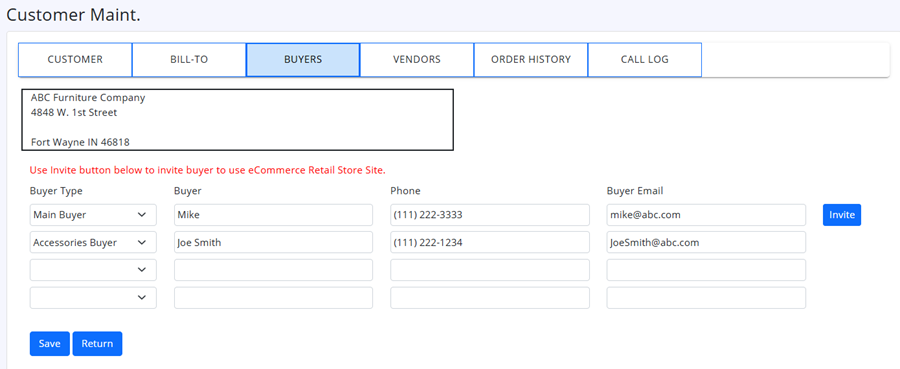
Find Store in your customer listing, and edit the customer.
Click the Buyers tab.
Verify the buyer info is all correct, including email address. And click the Invite Button.
Invite Confirmation Dialog:
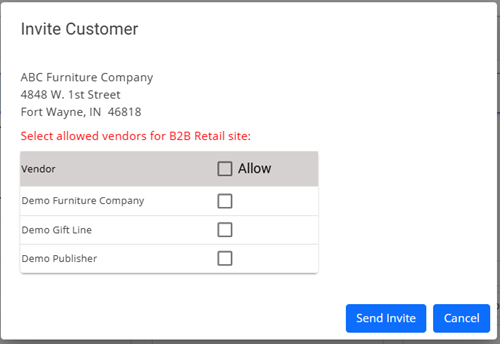
Select the vendors you wish this store/buyer to have access to, and click Send Invite button.
An email will then be sent to buyer with instructions for setting up their password to B2B site.
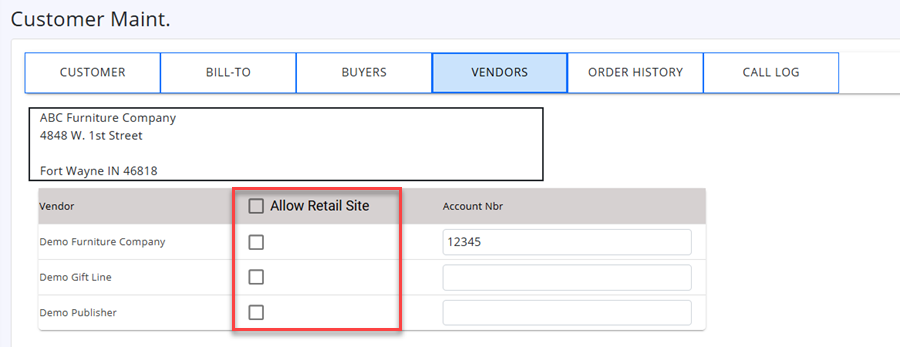
You can also edit the vendors the store has access to on B2B site on the Vendor tab.
Want to learn more?
Learn more about how SalesRepPro tools empower Salespeople to build better orders and focus more time nurturing relationships with their retail buyers, by booking your free demo of SalesRepPro today.
Request Demo